Features
Dashboard
Manage your time capsules from the dashboard
Dashboard
Your central hub for managing all time capsules.
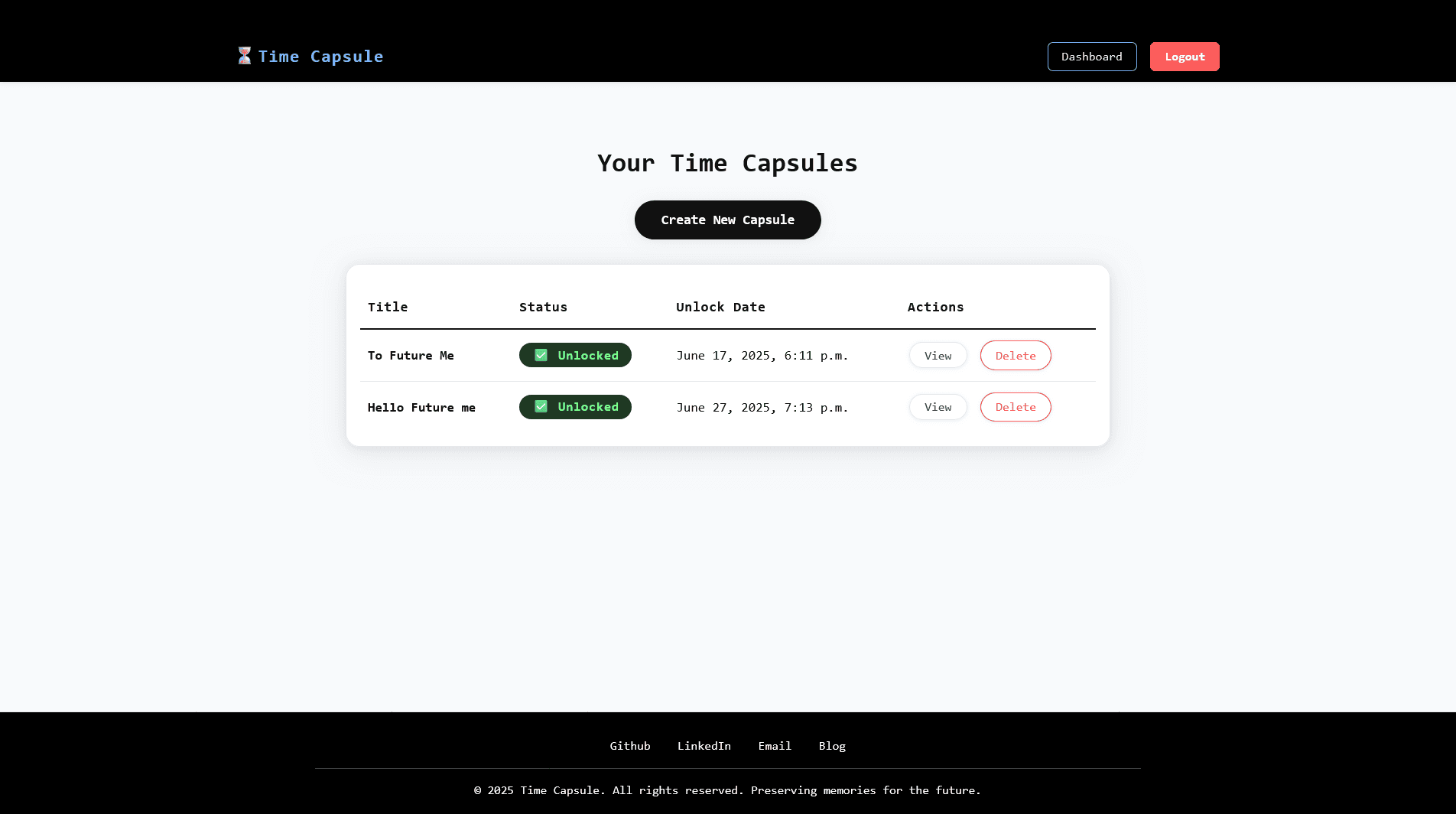
Overview
The dashboard displays all capsules you've created with:
- Capsule titles
- Real-time status (Locked/Unlocked)
- Creation dates
- Quick action buttons
Accessing the Dashboard
After logging in, you're automatically redirected to:
/dashboard/Or click "Dashboard" in the navigation menu.
Capsule List
Display Format
Each capsule shows:
┌─────────────────────────────────────┐
│ 🔒 My First Capsule                 │
│ Created: Jan 15, 2024               │
│ Status: Locked                      │
│ [View Details] [Delete]             │
└─────────────────────────────────────┘
Status Indicators
Locked 🔒
- Unlock date is in the future
- Content not yet accessible
- Email not sent
- Visual indicator (red/orange)
Unlocked 🔓
- Unlock date has passed
- Content fully accessible
- Email sent to recipient
- Visual indicator (green)
Actions
View Details
Click "View Details" or the capsule title to see:
- Full content
- Unlock date and time
- Recipient email
- Attached image
- Current status
Create New Capsule
Click "Create Capsule" button to:
- Open creation form
- Add new time capsule
- Schedule email delivery
Delete Capsule
Click "Delete" to:
- Remove capsule permanently
- Delete associated images
- Remove recipient records
Deletion cannot be undone!
Real-Time Status
Status is calculated on every page load:
now = timezone.now()
for capsule in capsules:
    if capsule.unlock_date > now:
        capsule.status = 'Locked'
    else:
        capsule.status = 'Unlocked'
This ensures accurate status display without manual updates.
Empty State
If you have no capsules:
- Welcome message displayed
- "Create Your First Capsule" button
- Quick start guide
Sorting and Filtering
Currently displays:
- All user's capsules
- Sorted by creation date (newest first)
Future versions may include filtering by status and search functionality
Navigation
From the dashboard, you can:
- View capsule details
- Create new capsules
- Delete existing capsules
- Access user settings
- Log out
Security
- Only shows your own capsules
- Other users cannot see your capsules
- Authentication required to access
- CSRF protection on all actions
Mobile Responsive
The dashboard is fully responsive:
- Works on phones and tablets
- Touch-friendly buttons
- Optimized layout for small screens
- Consistent experience across devices
Performance
- Efficient database queries
- Minimal page load time
- Real-time status calculation
- Optimized for many capsules